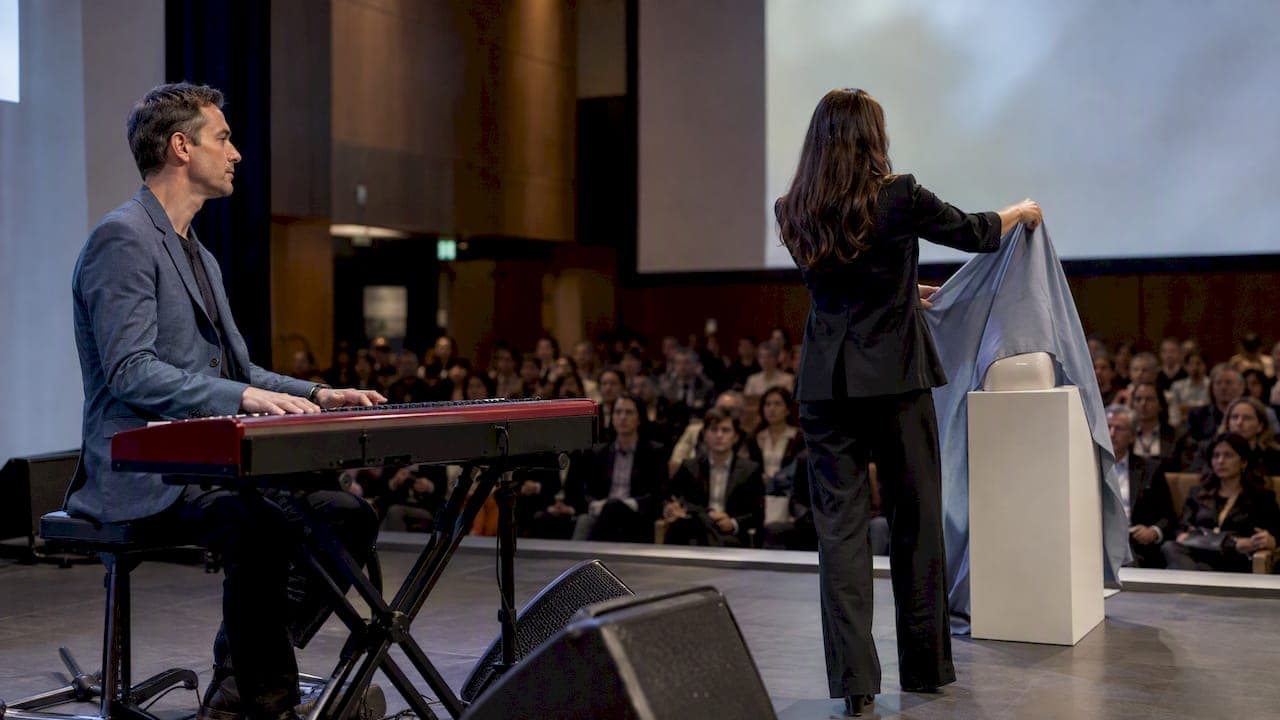
For energetic, launch-ready music, start in curated royalty-free libraries such as YouTube Audio Library, Envato Elements, Artlist, Pixabay, and Audio Network, confirming licenses carefully. Filter by tempo and build, favor fast, major-mode tracks with a clear rise toward the reveal, and confirm the license before you publish anything. Search with BPM and mood filters first, then preview a 20 to 30 second cut aligned to your reveal moment.
TL;DR:
- Choose tracks with a brisk BPM and a major mode, especially those with a 10 to 30 second build leading into the reveal, for maximum impact.
- Use filters for tempo, duration, and stems during search to quickly shortlist tracks that match your campaign’s mood, length, and synchronization needs.
- Verify that licensing explicitly covers sync rights, commercial use, and platform restrictions before publishing to avoid costly legal issues.
- For live launch events, consider hiring musicians or hybrid setups to adapt dynamically to the audience’s energy, which stock tracks cannot achieve.
- Carry the selected music into social teasers and presentations for brand consistency, ensuring the same track or its trimmed version ties the campaign together.
Table of Contents
- Where to find royalty-free tracks for a product launch
- How to choose the right track for a product reveal
- Finding launch-ready cuts: a step-by-step search workflow
- Licensing rules to check before you publish
- Timing the reveal: when to pick music and how to cut to it
- Practitioner notes: when live music beats a stock track
- Bringing music into the rest of your launch marketing
- Choosing music that matches your product's personality
- Another option: live or hybrid music for launch events
- FAQ
- Sources
Where to find royalty-free tracks for a product launch
Not every library serves the same purpose, and knowing which one to open first saves hours. Free collections like Pixabay and YouTube Audio Library work well for teasers, internal previews, or social posts where budget is tight and the stakes are lower. Subscription libraries like Envato Elements, Artlist, and Audio Network cost more but deliver a tighter catalog, cleaner mixing, and license terms built for commercial use, including paid ads and sponsored placements.
Each library has its own strengths worth knowing before you search:
- Pixabay: a free collection with simple mood and genre tags, best for quick social cuts or early-stage edits where you're not yet locked into a direction.
- YouTube Audio Library: built into YouTube's own creator tools and confirmed by YouTube's own documentation to be copyright-safe for uploads to the platform.
- Envato Elements: a large subscription catalog with stems, cut-downs, and commercial licensing bundled into one flat fee, strong for teams producing launch content on a regular cadence.
- Artlist: curated, polished tracks with flexible licenses that cover multiple projects under one plan, a good fit when you need a consistent sound across a launch campaign.
- Audio Network: a professional catalog aimed at agencies and brands, with practical guidance on choosing launch music that treats structure, not genre, as the main decision point.
If you're posting directly to YouTube and want zero copyright friction, the Audio Library is the fastest safe option. If you're producing a multi-platform campaign with paid media behind it, a subscription library gives you broader licensing coverage and a more consistent production quality across tracks.
How to choose the right track for a product reveal
Picking a track by ear alone is a gamble. A faster, more defensible approach treats the decision as a short checklist:
- Tempo: aim for a brisk BPM, since faster tempo music tends to strengthen positive brand attitudes and purchase intent when paired with the right mode, according to research on tempo, mode, and purchase intention.
- Mode: major-key tracks read as upbeat and confident, and the same research found the combination of fast tempo and major mode produces a stronger effect on buying intent than either trait alone.
- Instrumentation and timbre: the texture of a track shapes how viewers judge your product. Research on attention, tempo, and timbre found that when listeners actively attend to music, faster tempos are linked to a sense of speed and certain timbres, like brass, are linked to a sense of durability.
- Arrangement: look for builds, drops, and strategic silence rather than a flat, constant energy level from start to finish.
- Production polish: a clean, professionally mixed track reads as more premium on screen than a rougher amateur recording, even at the same tempo.
Match the track's character to your product category: clean, minimal electronic tones suit tech launches, restrained orchestral or sparse piano work suits luxury goods, and characterful indie or alt-rock tracks suit lifestyle brands with more personality. For guidance on matching musical tone to brand personality, the same logic that applies to corporate events applies to launch videos.
Pro Tip: Look for tracks with a 10 to 30 second build leading into the reveal moment. That window gives you room to cut on the beat without rushing the payoff.
When sync needs to be tight, pick a track with stems available rather than trying to force a locked mix to fit your edit.
Finding launch-ready cuts: a step-by-step search workflow
A focused search beats endless scrolling. Work through it in order:
- Define your mood and BPM first. Decide whether you want "hype," "uplifting," or "confident" before you open a library, and settle on a target BPM range typical for energetic reveals.
- Apply filters for tempo, duration, and stems. Most libraries let you narrow by mood tag plus BPM plus clip length in a single pass.
- Search specific phrases. Try combinations like "product launch," "hype build," "uplifting electronic," or just "build" to surface tracks designed for exactly this moment.
- Shortlist 3 to 5 candidates and test them against your edit. Drop each into a 15 to 30 second cut around your reveal and watch it with the picture, not in isolation.
- Check for conflicts before you commit. Listen for loudness spikes, key clashes against any voiceover, flat dynamic range, and whether the drop lands where your visual reveal actually happens.
When a track is close but not exact, use stems to rebuild the arrangement around your edit: trim instrumentation during dialogue, add a half-second of silence before the reveal for contrast, and drop in a short riser or drum hit exactly on the cut. For projects that involve a composer or sound designer sending you custom stems, a shared workspace like Audome's collaboration tools keeps high-resolution files, revisions, and feedback organized instead of scattered across email threads.
Licensing rules to check before you publish
Music licensing mistakes are expensive to fix after the fact, so verify terms before the video goes live, not after.
- Confirm sync rights and commercial use are explicitly covered, not just implied by a "royalty-free" label.
- Check territory and platform restrictions, since some licenses cover web use but exclude broadcast or paid social ads.
- Know whether your license is single-use or multi-use before you repurpose the same track across several campaigns.
- Save your license documentation. Download the PDF or screenshot the terms and attach them to your project notes.
On YouTube specifically, Audio Library tracks are confirmed copyright-safe for uploads, while Creator Music offers licensing and revenue-share options for U.S. creators with their own usage limits and eligibility rules that are worth reading closely, since a license purchased through Creator Music may be single-use and non-transferable.
YouTube's own guidance notes that tracks from outside the official Audio Library are not guaranteed copyright-safe, even when a third-party site labels them "royalty-free." That documentation warns creators to verify the original license on the source site, since metadata and licensing terms on external libraries can change after you've already published.
Timing the reveal: when to pick music and how to cut to it
Choose your track before you lock the edit, not after, so the cut can follow the music's natural builds instead of fighting them. Audio Network's guidance on launch videos puts it plainly: think structure over genre, and let restraint do some of the work.
- Leave a 2 to 4 beat lead-in before the reveal so the moment feels set up rather than sudden.
- Drop in 0.25 to 0.5 seconds of silence right before the reveal for contrast.
- Use a riser or filter sweep to mark the product's arrival on screen.
- If the track almost fits, a small tempo stretch of a few percentage points rarely introduces audible artifacts on modern editing software, and cutting to the nearest downbeat usually solves timing mismatches better than trimming mid-phrase.
Pro Tip: When nothing in the catalog lines up with your exact reveal timing, ask the library or composer for stems. A few isolated layers give you far more control than editing a finished mix.
Practitioner notes: when live music beats a stock track
For in-person launch events, a stock track playing through a PA system is rarely as effective as a live ensemble or hybrid DJ and live setup. A performer can read the room, extend a build until the crowd's energy peaks, or hold a dramatic pause until the exact second the product appears, something a pre-rendered file simply cannot do. Briefing a musician well so their performance lines up with video assets or lighting cues makes the difference between a reveal that feels scripted and one that feels alive.

Bringing music into the rest of your launch marketing
A launch video's soundtrack shouldn't live in isolation. Carry the same track, or a trimmed version of it, into the social teasers that lead up to launch day so the audio becomes a recognizable signal before the full video even drops. A 6 to 15 second clip built around the track's drop works well as a standalone Reel or Short, separate from the full launch video.

In live presentations, use a short instrumental cut, without vocals, as walk-in or transition music so it doesn't compete with a speaker's voice. Keep the same track family across the keynote, the product page's background video, and any trade show booth loop so the sonic identity stays consistent across every touchpoint a prospective customer encounters.
For email or landing page teasers that include video previews, the same 20 to 30 second cut used in paid social often works without modification, which saves a separate licensing check as long as the original license already covers web and commercial use across those placements. Treat the track less like a decoration and more like a recurring motif that ties the whole campaign together, the same way a recognizable jingle anchors a long-running ad campaign.
Choosing music that matches your product's personality
I'd rather hear a track that fits a product's actual character than the loudest option in the search results. Start the music search early, treat it as a creative partner shaping the edit, not filler added at the end. For live-event sound, our cocktail hour soundscapes piece goes deeper.
— Alex
Another option: live or hybrid music for launch events
Stock tracks work well for video, but an in-person launch party or on-stage reveal often calls for something stock libraries can't deliver: a performer who adjusts in real time to the room. We offer corporate event entertainment built around that need, including options that blend DJ control with live instrumentation.
A typical booking includes consultation to understand your reveal moment and brand tone, a tailored setlist built around your event's pacing, and timing coordination so the music hits your reveal cues precisely.
If your launch includes a live or hybrid component, our corporate event entertainment options are worth a look alongside your recorded video soundtrack.
FAQ
What are some good songs for product reels?
Fast-tempo, major-mode tracks with a short build work best for product reels, since that combination tends to strengthen positive purchase intent according to research on tempo and mode. Search royalty-free libraries using tags like "uplifting electronic" or "hype build" rather than hunting for specific song titles.
What are some good songs to use for a business launch?
For a business launch video, look for tracks with a clean build, a confident major-key feel, and production polish rather than mellow or minor-key background music. Libraries like Envato Elements and Artlist are good starting points for polished, commercial-ready options, while Audio Network's guidance recommends prioritizing structure over genre.
What is a good entrance theme song?
A strong entrance theme typically has a fast tempo, a clear rhythmic pulse, and a short instrumental intro that builds anticipation before a vocal or main theme drops. For live events, a performer can extend or shorten that build in real time to match the moment, something a fixed recording can't do, which is one reason live or hybrid setups are often chosen for in-person entrances.
What's a good song for a grand opening?
Grand openings generally call for an upbeat, major-key track with broad appeal, something energetic enough to set a celebratory tone without overwhelming conversation. For in-person events, a live ensemble can read the crowd and adjust energy as guests arrive, offering more flexibility than a looped playlist.
Where can I legally get royalty-free music for a product launch?
Reliable sources include Pixabay, YouTube Audio Library, Envato Elements, Artlist, and Audio Network, each with its own license scope and catalog style. Always confirm the license covers your intended use, since YouTube's documentation notes that only Audio Library tracks are guaranteed copyright-safe on that platform, and third-party "royalty-free" claims should be verified at the source.
Sources
- Attention required for advertisement pitch, tempo, and timbre to influence the perception of product features | Music Perception | University of California Press
- Research on music, mode, tempo and purchase intention (Open University repository)
- How to find music for a product launch video — Audio Network blog
- Use music and sound effects from the Audio Library - YouTube Help